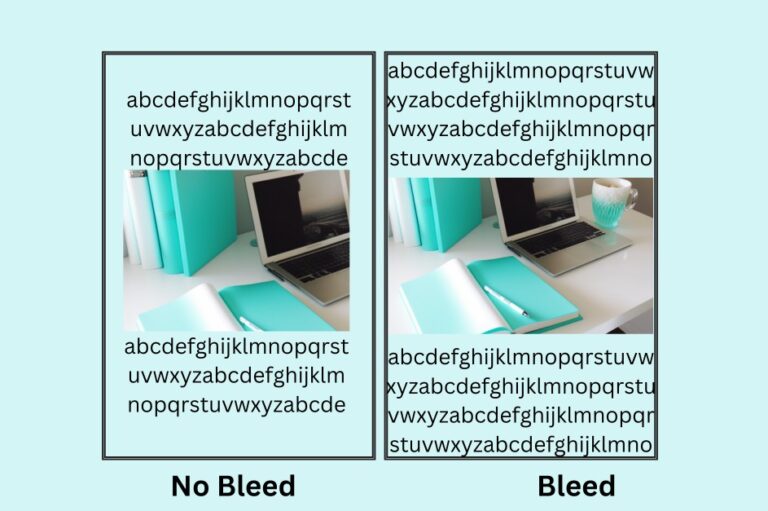
Self-publishing has revolutionized the world of book publishing, empowering authors to take control of their creative works and reach a global audience without the traditional gatekeepers of the publishing industry. What was once a niche option has become a mainstream path to publication, with self-published authors regularly appearing on bestseller lists and earning sustainable incomes from their writing.
In this comprehensive guide, we will delve into the requirements and essential tools for self-publishing, equipping you with the knowledge and resources needed to embark on your self-publishing journey with confidence. Whether you’re publishing your first novel, a collection of poetry, a children’s book, or a non-fiction guide, this roadmap will help you navigate the process successfully.

Understanding the Self-Publishing Landscape
Before we dive into the specifics, it’s worth understanding why self-publishing has become such a powerful option for authors. According to recent industry reports, self-published titles now represent a significant portion of e-book sales, and platforms like Amazon Kindle Direct Publishing have made it possible for authors to earn up to 70% royalties on their books—far more than traditional publishing typically offers.
Self-publishing isn’t just about uploading a Word document and hoping for the best. It requires careful planning, quality execution, and strategic decision-making. Let’s explore the essential requirements and tools that will set you up for success.
Self-Publishing Requirements: Setting the Stage for Success
Before diving into the self-publishing process, it’s crucial to understand the key requirements that will pave the way for a successful publishing experience.
1. Manuscript Preparation and Editing
Crafting Your Manuscript: Write and polish your manuscript to ensure it is complete, well-structured, and meets the standards of your chosen genre. This means understanding the conventions of your genre—word count expectations, typical story structures, and reader expectations.
For fiction writers, a typical novel ranges from 70,000 to 100,000 words, though this varies by genre. Romance novels might be shorter (50,000-90,000 words), while epic fantasy can run much longer (100,000-120,000+ words). Non-fiction books typically range from 40,000 to 80,000 words depending on the topic and target audience.
Professional Editing: Consider hiring a professional editor or seeking beta readers to provide valuable feedback and ensure the quality of your work. Professional editing is one of the most important investments you can make in your book’s success.
There are several types of editing to consider:
- Developmental Editing: Focuses on big-picture elements like plot, character development, pacing, and structure
- Line Editing: Improves flow, style, and language at the sentence and paragraph level
- Copy Editing: Addresses grammar, punctuation, spelling, and consistency
- Proofreading: The final polish to catch any remaining typos or errors
You can find qualified editors through professional organizations like the Editorial Freelancers Association or Reedsy, a marketplace specifically designed to connect authors with vetted publishing professionals. Many authors also find success by joining writing communities like Scribophile where writers exchange critiques and feedback.
Beta Readers: Before professional editing, consider recruiting beta readers—members of your target audience who can provide feedback on your manuscript. They can identify plot holes, confusing sections, or pacing issues that you might miss as the author. You can find beta readers through writing groups, social media communities, or platforms like BetaBooks.
2. Cover Design and Formatting
Eye-Catching Cover Design: Create a visually appealing cover that captures the essence of your book and entices readers. Your cover is your book’s most important marketing tool—readers absolutely do judge books by their covers, especially in the digital marketplace where your thumbnail image needs to stand out among thousands of other books.
A professional cover should:
- Clearly communicate your book’s genre
- Be legible at thumbnail size (crucial for online retailers)
- Follow current design trends in your genre while remaining timeless
- Feature high-quality, high-resolution images and typography
- Create an emotional connection with your target audience

Design Options:
If you have design skills and software like Adobe Photoshop or Adobe InDesign, you can create your own cover. However, most authors benefit from working with professional designers.
For budget-conscious authors, Canva Pro offers pre-made book cover templates that you can customize, though be cautious about using obvious templates that may not look unique. 99designs offers design contests where multiple designers compete for your project, giving you various options to choose from.
For professional results, consider hiring a designer through Reedsy, Fiverr, or seeking recommendations from other self-published authors in your genre. Expect to invest $200-$500 for a quality professional cover design.
Formatting and Layout: Format your manuscript for e-book and print formats, ensuring readability and compatibility across various devices and platforms.
E-book formatting needs to be flexible to accommodate different screen sizes and reading devices. Key considerations include:
- Clean, simple formatting that adapts to different devices
- Proper chapter breaks and table of contents with working hyperlinks
- Properly formatted front matter (title page, copyright page, etc.)
- Consistent paragraph spacing and indentation
- Optimized images (if applicable)
For print formatting, you’ll need to consider:
- Trim size (common sizes include 5″ x 8″, 5.5″ x 8.5″, and 6″ x 9″)
- Interior layout and margins
- Headers and page numbers
- Front and back matter
- Proper formatting for print-on-demand specifications
Formatting Tools:
Vellum is the gold standard for Mac users, offering beautiful, professional formatting for both e-books and print books with minimal effort. It’s a one-time purchase that many authors consider worth every penny.
Atticus is a newer option that works on both Mac and Windows, offering similar functionality to Vellum at a competitive price point.
For free options, Calibre can handle e-book formatting, though it has a steeper learning curve. Draft2Digital offers free formatting as part of their distribution services, which can be an excellent option for authors just starting.
Reedsy Book Editor is a free online tool that allows you to write and format your book directly in your browser, then export it in various formats.
3. ISBN and Copyright
ISBN (International Standard Book Number): Obtain an ISBN for your book, a unique identifier that facilitates distribution and tracking. Think of an ISBN as your book’s social security number—it uniquely identifies your specific edition and format.
Understanding ISBNs:
- Each format of your book needs its own ISBN (paperback, hardcover, e-book if required)
- ISBNs are not mandatory for e-books on Amazon KDP, but are required for print books
- Having your own ISBN (rather than a free one from a platform) means you are listed as the publisher
- ISBNs are essential if you want your book in libraries, bookstores, or distributed beyond Amazon
Where to Purchase ISBNs:
In the United States, the official ISBN agency is Bowker. While a single ISBN costs $125, buying in bulk (10 ISBNs for $295) is more economical if you plan to publish multiple books or formats.
In the UK and other territories, contact Nielsen for ISBNs.
In Canada, ISBNs are free through Library and Archives Canada.
Free ISBN Alternatives:
Amazon KDP offers free ISBNs for print books, though Amazon will be listed as the publisher. This is fine if you only plan to sell through Amazon, but limits your distribution options.
Draft2Digital and IngramSpark also offer free ISBN options with similar considerations.
Copyright Registration: Consider registering your book’s copyright to protect your intellectual property rights.
In most countries, copyright is automatically granted when you create an original work and fix it in tangible form. However, formal registration provides additional benefits:
- Public record of your copyright claim
- Ability to sue for copyright infringement in the United States
- Eligibility for statutory damages and attorney’s fees in infringement cases
- Prima facie evidence of copyright validity
In the United States, register your copyright through the U.S. Copyright Office. The online registration process costs $65 and is straightforward to complete.
For international copyright protection, understand that most countries are signatories to the Berne Convention, which means your U.S. copyright is recognized internationally.

4. Distribution Platforms
Selecting Distribution Channels: Choose self-publishing platforms like Amazon Kindle Direct Publishing (KDP), Smashwords, or Draft2Digital to make your book available to a wide audience.
The self-publishing landscape offers two main distribution approaches:
Direct Distribution: Publishing directly with individual retailers
- Amazon Kindle Direct Publishing (KDP) – The largest platform by far
- Apple Books for Authors – Direct publishing to Apple’s ecosystem
- Kobo Writing Life – Popular internationally, especially in Canada
- Barnes & Noble Press – Direct access to B&N customers
- Google Play Books – Growing platform with global reach
Aggregator Distribution: Using services that distribute to multiple retailers
- Draft2Digital – Free distribution to multiple retailers with excellent customer service
- PublishDrive – Distribution to 400+ stores worldwide
- Smashwords – One of the original aggregators, distributing to major retailers
Print-on-Demand Services:
- Amazon KDP Print – Easiest integration with Amazon
- IngramSpark – Industry-standard for bookstore and library distribution
- Barnes & Noble Press – Print books directly to B&N
- Lulu – Flexible options for various print formats
Retailer-Specific Requirements: Familiarize yourself with the specific guidelines and formatting requirements of each platform or retailer.
Each platform has its own specifications for file formats, cover dimensions, pricing requirements, and metadata. Create a checklist for each platform you use to ensure you meet all requirements. The Alliance of Independent Authors (ALLi) provides excellent resources on platform-specific requirements.
Essential Tools for Self-Publishing Success
Equipping yourself with the right tools can significantly enhance your self-publishing journey. Here are some essential tools to consider:
1. Writing and Editing Tools
Word Processors:
Microsoft Word remains the industry standard, offering robust writing and editing features, track changes functionality, and compatibility with most editors and formatters. Microsoft 365 subscriptions start at $6.99/month and include cloud storage and collaboration features.
Google Docs offers a free, cloud-based alternative that’s excellent for collaboration and accessible from any device. Many authors use Google Docs for first drafts and early revisions.
Scrivener is the favorite of many professional authors for its organizational features, research management, and ability to handle large, complex projects. At $49 for a one-time purchase, it’s one of the best investments a serious writer can make. Scrivener allows you to:
- Organize chapters, scenes, and research in one place
- View your manuscript in various ways (corkboard, outline, manuscript)
- Set writing targets and track progress
- Compile your manuscript in various formats
- Keep character sheets, plot notes, and research alongside your writing
Atticus combines writing, formatting, and collaboration in one tool, making it a comprehensive solution for the entire writing process.
For distraction-free writing, consider FocusWriter (free), WriteMonkey (free), or iA Writer ($49.99).
Grammar and Style Checkers:
Grammarly can assist in identifying grammar, punctuation, and style issues, improving the quality of your writing. The free version catches basic errors, while Grammarly Premium ($12/month) offers advanced suggestions on clarity, engagement, and delivery. However, remember that Grammarly is not a substitute for professional editing.
ProWritingAid offers similar functionality with additional features for fiction writers, including reports on pacing, dialogue, and repetition. Many authors find ProWritingAid’s lifetime license ($399) to be a worthwhile investment.
Hemingway Editor (free web version, $19.99 desktop app) highlights complex sentences and common errors, helping you write with clarity and confidence.
AutoCrit specifically targets fiction manuscripts, comparing your work against published books in your genre to identify areas for improvement.
2. Design and Formatting Tools
Graphic Design Software:
Adobe Creative Cloud offers industry-standard tools including Photoshop for image editing and InDesign for professional layout. The Photography plan ($9.99/month) includes Photoshop and Lightroom, while the full Creative Cloud suite ($54.99/month) includes all Adobe applications.
Canva Pro ($12.99/month or $119.99/year) enables you to design captivating book covers, promotional materials, social media graphics, and more using intuitive drag-and-drop tools and thousands of templates. For authors who aren’t designers, Canva can be a game-changer.
GIMP is a free, open-source alternative to Photoshop with powerful image editing capabilities, though with a steeper learning curve.
Affinity Publisher offers professional layout capabilities similar to InDesign but with a one-time purchase price ($69.99) instead of subscription.
Formatting Software:
Vellum (Mac only, $249.99 for e-books and print) simplifies the process of formatting your manuscript for different e-book and print formats with beautiful, professional results.
Atticus ($147 one-time payment) offers similar functionality to Vellum but works on both Mac and Windows.
Calibre is free and open-source, offering comprehensive e-book management and conversion capabilities.
3. Cover Image Creation
Stock Image Websites:
Unsplash provides free, high-quality images with a very generous license that allows commercial use.
Pexels offers another excellent source of free stock photos and videos.
For premium images with more specific options:
- Shutterstock – Massive library with subscription options starting at $29/month for 10 images
- Adobe Stock – Integrated with Adobe Creative Cloud
- Deposit Photos – Affordable alternative with flexible pricing
- iStock – Wide variety of images at various price points
Important licensing note: Always verify that stock images are licensed for commercial book cover use. Some “free” images have restrictions on commercial use or require attribution.
Graphic Design Tools:
Canva allows you to customize and create professional-looking cover images using stock photos, fonts, and design elements. Canva Pro provides access to premium photos and elements.
Adobe Spark (now Adobe Express) offers similar functionality with integration into the Adobe ecosystem.
BookBrush specializes in creating promotional graphics for books, including 3D mockups and social media images.
4. ISBN and Copyright Registration
ISBN Agencies:
Contact your local ISBN agency or purchase ISBNs from reputable providers:
- Bowker (United States)
- Nielsen (United Kingdom)
- Library and Archives Canada (free for Canadian authors)
Copyright Registration Services:
- U.S. Copyright Office – Official government registration
- Copyright Alliance – Resources and education on copyright protection
- Authors Guild – Advocacy and resources for authors’ rights

5. Self-Publishing Platforms
Amazon Kindle Direct Publishing (KDP):
Amazon KDP is the largest self-publishing platform, offering a wide range of tools and resources for authors to publish and distribute their books. With KDP, you can:
- Publish e-books and paperbacks (and hardcovers) for free
- Earn up to 70% royalties on e-books priced $2.99-$9.99
- Reach millions of readers worldwide
- Use KDP Select for additional promotional tools (requires exclusivity)
- Access real-time sales reporting
KDP is often the first platform authors choose, and many successful self-published authors sell exclusively on Amazon. However, consider whether Amazon exclusivity aligns with your long-term goals.
Smashwords:
Smashwords is a platform that allows authors to distribute their e-books to multiple retailers, including Barnes & Noble, Apple Books, Kobo, and library platforms like OverDrive and Baker & Taylor. While the interface is less modern than some competitors, Smashwords has been a trusted aggregator for over a decade.
Draft2Digital:
Draft2Digital simplifies the distribution process by converting and distributing your e-book to various retailers including Apple Books, Barnes & Noble, Kobo, and many others. Their customer service is exceptional, and they offer free formatting tools. Unlike some aggregators, Draft2Digital doesn’t take a percentage beyond what retailers charge.
PublishDrive:
PublishDrive offers distribution to 400+ stores worldwide and includes features like price promotions, AI-powered metadata optimization, and Amazon advertising integration.
Additional Resources and Tools
Author Websites and Email Marketing:
Building an author platform is crucial for long-term success. Consider:
- WordPress – Free, flexible website builder (requires hosting)
- Wix – User-friendly website builder with author templates
- Squarespace – Beautiful templates with integrated e-commerce
- Author Platform Rocket – Author-specific training
For email marketing:
- Mailchimp – Free for up to 500 subscribers
- MailerLite – Free for up to 1,000 subscribers
- ConvertKit – Popular with authors and content creators
- BookFunnel – Specializes in book delivery and email list building
Book Marketing Tools:
- BookBub – Featured deal promotions can dramatically boost sales
- NetGalley – Advance reader copies for reviewers and industry professionals
- Goodreads Author Program – Free tools to connect with readers
Project Management and Productivity:
- Trello – Visual project management (free)
- Asana – Task management for authors juggling multiple projects
- Notion – All-in-one workspace for notes, planning, and databases
Learning and Community:
- Alliance of Independent Authors (ALLi) – Professional organization for self-published authors ($99/year)
- Self-Publishing School – Courses and resources for indie authors
- The Creative Penn – Excellent blog, podcast, and courses on self-publishing
- Wide for the Win – Resources for authors publishing across multiple platforms
FAQ Section
Q1: Do I need to hire a professional editor for self-publishing?
While hiring a professional editor is not mandatory, it is highly recommended and often the difference between a book that looks self-published and one that rivals traditionally published works. Professional editing can enhance the quality of your book, ensuring it meets industry standards and providing a better reading experience for your audience.
Poor editing is one of the quickest ways to earn negative reviews and damage your author reputation. Consider it an investment in your career rather than an expense. Most professional editors offer sample edits so you can find the right fit for your manuscript and budget.
Q2: How important is book cover design for self-published books?
Book cover design plays a crucial role in attracting readers and making a strong first impression. Studies show that readers make snap judgments about books based on covers in just 2-3 seconds when browsing online. A professionally designed cover can significantly impact book sales and reader engagement, so investing in a compelling cover design is highly recommended.
Your cover needs to work at thumbnail size (as small as 150 pixels wide on some platforms) while still being clear and appealing. It should signal your genre immediately and promise the reading experience inside. Amateur covers are one of the biggest tells of self-published books and can deter potential readers regardless of how good your writing is.
Q3: Are there any upfront costs associated with self-publishing?
The costs associated with self-publishing can vary widely depending on your approach and budget. While some tools and services are available for free or at a low cost, investing in professional editing, cover design, and marketing may require a financial investment.
A realistic budget for a quality self-published book might include:
- Editing: $500-$3,000 depending on manuscript length and editing type
- Cover Design: $200-$500 for professional work
- Formatting: $0-$200 (many tools are free or low-cost)
- ISBN (if purchasing): $125-$295
- Marketing: Variable, but budget at least $100-$500 for launch promotion
However, you can start with minimal investment and gradually reinvest earnings into professional services. Many successful self-published authors started with tight budgets and scaled up as their books generated income. It’s important to budget accordingly and assess the expenses based on your specific publishing goals.
Q4: Do I need an ISBN for my self-published book?
An ISBN is not mandatory for self-published e-books on platforms like Amazon Kindle Direct Publishing (KDP), as they provide their own identification system (ASIN). However, having an ISBN can be beneficial for print books or if you plan to distribute your e-book to other platforms or retailers.
ISBNs become essential if you want to:
- Distribute print books to bookstores and libraries
- Publish on multiple platforms with the same edition
- Have yourself listed as the publisher (rather than the platform)
- Submit your book for industry recognition or awards
- Distribute through expanded channels beyond Amazon
If you plan to publish only e-books exclusively on Amazon, you may not need ISBNs. For most authors with broader distribution goals, purchasing your own ISBNs is worthwhile.
Q5: How do I protect my book’s copyright?
In most countries, copyright is automatically granted to the author upon creation of the work and fixing it in a tangible form. The moment you write your manuscript, you own the copyright. However, registering your book’s copyright with the appropriate authorities provides additional legal protection and establishes a public record of ownership.
In the United States, registration through the U.S. Copyright Office ($65 online) is required before you can sue for copyright infringement and makes you eligible for statutory damages. In other countries, similar registration systems may exist, though the Berne Convention provides international copyright protection for your work in member countries.
For most self-published authors, copyright registration is a good precaution, especially if you’re concerned about plagiarism or plan to license your work. Always include a proper copyright page in your book with the copyright symbol (©), year of publication, and your name.
Consult your local copyright office or seek legal advice for specific requirements in your jurisdiction.
Q6: Can I change the book details or cover after self-publishing?
Yes, most self-publishing platforms allow you to make changes to your book details and cover after publication, which is one of the major advantages of self-publishing over traditional publishing. You can update:
- Cover design
- Book description and keywords
- Pricing
- Interior content (correcting errors, adding content)
- Author bio and photos
- Categories and metadata
However, it’s important to check each platform’s specific guidelines and ensure that any changes are compatible with the distribution channels and retailers. Some platforms make changes live immediately, while others may take 24-72 hours to update.
Important note: If you’ve already generated reviews and sales, major changes (like a completely different cover or significant content revisions) may require publishing a new edition with a new ISBN to avoid customer confusion. Minor corrections and small updates can typically be made without creating a new edition.
Q7: Should I publish wide or exclusive to Amazon?
This is one of the most debated questions in self-publishing. Amazon’s KDP Select program offers benefits like Kindle Unlimited enrollment (where readers can borrow your book) and promotional tools, but requires 90-day exclusivity.
Publishing “wide” (across multiple platforms) means:
- Reaching readers who prefer non-Amazon retailers
- Not depending on a single company for your income
- Building a more stable, diversified author business
- Accessing international markets where Amazon isn’t dominant
Many successful authors use both strategies with different books, or start exclusive and then go wide after testing the market. Consider your genre (some do better in Kindle Unlimited than others), your marketing capabilities, and your long-term goals.
Q8: How long does the self-publishing process take?
The timeline varies significantly based on your preparation, budget, and goals. Here’s a general timeline:
- Writing the manuscript: 3-12 months (highly variable)
- Editing (developmental, line, copy, and proofreading): 2-4 months
- Cover design: 2-4 weeks
- Formatting: 1-2 weeks
- Pre-launch marketing and ARC (Advance Review Copy) distribution: 4-8 weeks
- Publication and distribution processing: 24-72 hours
From finished manuscript to publication, allow at least 3-6 months to do it well. Rushing the process usually results in lower quality and fewer sales. Many professional indie authors plan their publication dates 6-12 months in advance to allow time for quality production and strategic marketing.
Your Self-Publishing Journey Begins Now
Self-publishing offers authors an unprecedented opportunity to share their stories and ideas with the world. By understanding the key requirements and leveraging essential tools, you can navigate the self-publishing process more effectively and increase your chances of success.
Remember to focus on:
- Manuscript preparation with professional editing
- Professional cover design that competes in the marketplace
- ISBN and copyright considerations that protect your work and enable distribution
- Strategic distribution platforms aligned with your goals
- Quality tools that streamline your workflow and produce professional results
The self-publishing landscape continues to evolve, offering more opportunities and tools for independent authors than ever before. Technology has democratized publishing, but success still requires dedication to craft, attention to quality, and strategic thinking about your author career.
Embrace the freedom and creative control that self-publishing provides, and embark on your journey as an independent author, ready to share your unique voice and stories with a global audience. Start with one book, learn from the process, and continue to grow both as a writer and as a publishing professional.
The barriers to entry have never been lower, but the standards for success have never been higher. Invest in quality, build your skills, and approach self-publishing as the serious business it can be. Your readers are waiting for the story only you can tell.
Ready to start your self-publishing journey? What aspect of the process are you most excited (or nervous) about? Join my Facebook group and share your thoughts and questions!
Resources and Inspiration for Self-Publishers and KDP Users!
Disclosure: This post contains affiliate links. If you purchase through these links, I may earn a small commission at no additional cost to you. I only recommend tools and resources that provide genuine value to self-publishing authors.